
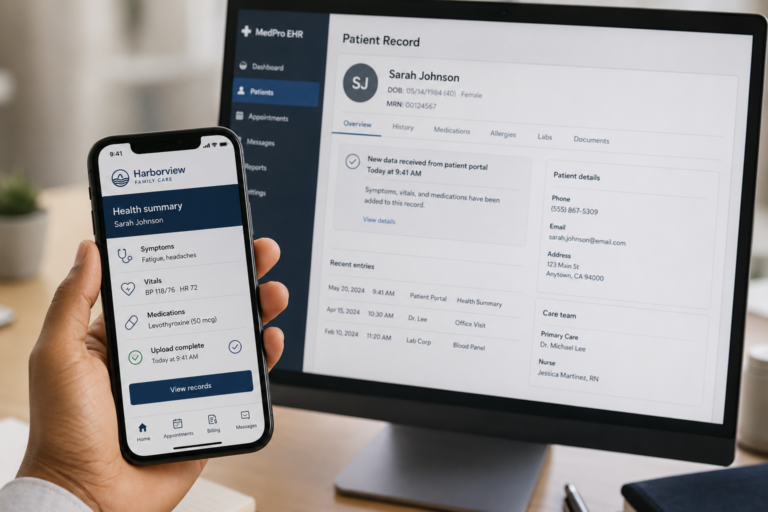
EHR patient portals work for simple, routine tasks, but specialty care needs continuous interaction and behavior‑change support. Custom apps provide that layer while syncing data from the app into the EHR and back again. Their success depends on fitting seamlessly into clinician workflows.
Key Takeaways
- Standard EHR portals don’t meet the needs of specialty care programs because they are built for breadth, not condition-specific workflows. A custom patient app addresses this by delivering targeted engagement. It extends rather than replaces the EHR by enabling data to move between both systems through bi-directional sync.
- Clinician acceptance is one of the leading indicators of whether a project and app succeed. These apps must be designed to reduce the burden for them, not add to it.
Electronic health records (EHRs) were developed to manage clinical information, not to drive patient engagement. Patients don’t choose their portals. They’re assigned to them, one per clinic, one per hospital system, with no say in the matter. This is why, while 90% of health care systems in the US now offer patient portals with EHR access, only 15% to 30% of patients use even a single portal feature. Patients tend to use portals only in specific settings, like outpatient care within integrated delivery systems.
EHRs are designed for breadth, covering every type of patient and condition. Unfortunately, that means they often don’t accommodate the specific workflows of specialty care. A urology patient managing a recurring kidney stone condition, for example, needs to track fluid intake, pain episodes, and lab trends over time. A generic portal built to serve every department in a hospital system isn’t designed for that kind of focused, condition-specific experience.
We often work with specialty practices that are building condition-specific treatment plans. In these instances, we’ve found custom patient-facing apps drive far better engagement. To build these apps, we work with clinicians to develop specialty-specific programming and content, tailor workflows to their practice, and define which data syncs with their EHR.
This article explains how custom patient apps and EHRs work together. We’ll cover:
- What information should move between your custom app and your EHR
- How a bi-directional data sync works in practice
- The key technical and regulatory considerations to address before you begin development
People often use the terms electronic medical records (EMRs) and EHRs interchangeably, but they aren’t exactly the same. We will use the term EHR in this article, as it is the more comprehensive system.
What is the difference between EMRs and EHRs?
The terms EMR and EHR are often used interchangeably, but they aren’t exactly the same. An EMR is a digital version of a patient’s chart within a single practice or clinic. It normally includes information such as medical history, treatment plans, diagnoses, medications, and test results, but for use by just one provider.
An EHR is designed to share a patient’s information across multiple healthcare providers, hospitals, and systems, giving a broader, more complete picture of a person’s health, as it can incorporate test results from more than one practice.
Why specialty care programs often extend the EHR with a custom app
Specialty care programs often require ongoing interaction between visits, whether that’s symptom tracking, adherence monitoring, progress updates, or long-term engagement around a specific condition.
While many EHR portals provide basic patient access to records, messaging, and appointments, by design, they have to serve a broad patient population. Specialty programs frequently require condition-specific workflows, content, and engagement models that are difficult to deliver through a standard portal experience.
As a result, many organizations choose to build a custom patient-facing app that integrates with the EHR. The app becomes the patient engagement layer, while the EHR remains the clinical system of record.
Once a custom patient app is introduced, one of the most important design decisions is determining how it will interact with the EHR. This includes deciding which information should flow between systems, how frequently it should be synchronized, and how clinicians will access patient-generated data within their existing workflows.
What US EHR interoperability requirements mean for your app
Most US providers already use an EHR due to Medicare billing requirements. Clinicians who bill Medicare must use certified EHR technology and meet the Promoting Interoperability requirements under MIPS, or face payment reductions of up to 9%. That framework started with the HITECH Act in 2009 and expanded under the 21st Century Cures Act in 2016, which added interoperability requirements.
In practice, this means the EHR remains the regulatory system of record, and a custom app extends what it offers patients. Because data flowing between the two is protected health information (PHI), the app must meet the same HIPAA security standards as your EHR, with the appropriate agreements in place between you and your development partner.
Winning clinician trust through seamless integration
In our experience, clinician acceptance is one of the leading indicators of whether your project and app succeed. A common worry we hear is that a new patient-facing app just becomes one more system for your team to manage.
When your clinicians can see patient-generated data inside the EHR they already use, without learning a new interface or entering more data, they adopt it. When it means logging into a separate dashboard or learning new software, they skip it, no matter how good the patient experience is. So your goal is to remove friction and let your clinicians work the way they always have. Research on EHR integration and bi-directional data flow in patient portals points in the same direction: design for the clinician’s workflow and make their day easier. One clinician described how hard it is to fit a new system into an unpredictable schedule:
“That’s not something that’s currently built into my day at all [checking messages], and I would have to say that, really, I’ve been very reliant on somebody else flagging that there’s a message for me … And mainly because our days can look very different; that’s a big concern, because there might be days where I won’t actually sit in front of a computer until midday. And yes, I do have a little concern with that.”
On the other hand, integration that removes extra steps consistently earns clinician buy-in. When the app writes patient input straight into the clinical record, you cut duplication and keep everything transparent:
“I really like the fact that it’s built into the [EMR] and that whatever is typed automatically goes into the notes, so there’s no copying and pasting you need to do from emails or from text messages; that becomes an instant part of the clinical progress notes. That’s really important for workflow and for absolute transparency to when things are happening in a live situation.”
When building a custom patient app, prioritize clinician workflow over the feature list. A patient app succeeds when it fits cleanly into a clinician’s existing system of record and when the app and EHR work together as one system.
Extending your EHR capability with bi-directional sync
Another objection we hear from clinicians when building a custom patient app is: “We already have an EHR. Why would we build something separate?” The answer is that the patient-facing app extends the EHR rather than replacing it.
A patient app connects directly to the EHR and enables data to move between both systems. This is what’s known as bi-directional sync. An example of this is when we built a HIPAA-compliant app for a urology practice’s bladder wellness program, which we designed around the specific workflows of their urogynecologist.
The clinician wanted the EHR to provide a clear view of a patient’s history in one place rather than having to pull data from 50 different places. The app we developed addressed this directly, with a curated AI assistant that pulls a patient’s clinical context from the EHR so the care team can see the relevant history in one place.
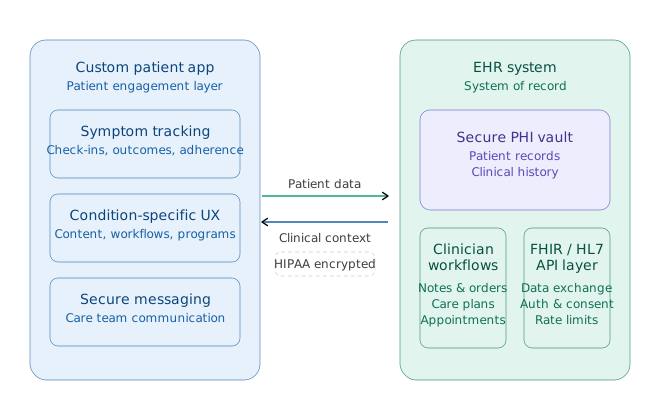
Information that typically flows from the patient app to the EHR includes:
- Symptom tracking
- Patient-reported outcomes
- Adherence data
- Daily or weekly check-ins
- Structured clinical updates
Information that could flow from the EHR to the app for patients to access includes:
- Patient demographics
- Appointment information
- Care plans
- Existing clinical context
This allows the app to pre-populate information during onboarding and personalize the experience around the patient’s treatment plan or condition.
But, in our experience, the data does not necessarily flow equally in both directions. Most data flows from the patient app into the EHR, with a smaller set of data going the other way.
How EHR integration capabilities affect your app
The data flow from EHR to the app is also more complex. The complexity comes from how the EHR handles integration. Some systems support modern FHIR APIs that allow relatively flexible, real-time data exchange. Others still rely heavily on older HL7 infrastructure, which can be more rigid and harder to extend.
At MindSea, we encountered a similar situation on a recent project where the client wanted to integrate their custom application with an EHR. We recommended using the EHR itself as the backend system rather than building a separate backend. We built the patient-facing app on top of Healthie, an off-the-shelf, HIPAA-compliant EHR with a robust API.
This approach ensured that all PHI remained within an already compliant system, which significantly reduced both development costs and compliance overhead. Healthie became the system of record, and the client established a BAA directly with Healthie.
If you use an EHR as the system of record, not only can it simplify compliance and reduce development effort, but it will also shape how you design the rest of the application. It’s important to consider how you’ll sync data between the two systems. A real-time sync creates a more responsive experience, but it is more complex and expensive to maintain. Periodic batched syncs are simpler and cheaper, but may introduce delays.
That is why scoping the integration early matters. The EHR you use determines what data is available, how reliably it can move between systems, and how much complexity the integration will introduce into the project.
Here are some questions to ask yourself to scope the integration before development starts
- Who owns the BAA relationships?
- Which EHR are we integrating with?
- Does it support FHIR APIs, HL7, or a custom API?
- What data needs to move in each direction?
- Which system is the source of truth?
- Does the data need real-time sync?
- What compliance requirements apply?
A side-by-side look at EHR portals and custom apps
Not every specialty program needs a custom-built app, and in some cases, the existing EHR portal is enough to support patient needs. The decision often comes down to a few key questions
- How complex and condition-specific the workflows are
- How much ongoing engagement and behavior change does the care model actually require
- Does the programme have the budget and resources to build and maintain a separate tool
Below, we look at when a custom app is the right option and when the EHR portal is enough.
| EHR Portal | Custom App |
| Patients only need results, prescriptions, or appointment booking | Patients need support or monitoring between visits |
| One-off or infrequent interactions | Condition-specific, ongoing engagement |
| No behavior change required | Success depends on behavior change or adherence |
| General patient population | Defined patient group with specific needs |
The choice may not necessarily be one or the other. Some EHR portals now support limited customization, while there are also lightweight patient apps that sit somewhere between the two.
Extending your current EHR to serve complex patient needs
Every EHR handles integration differently. It’s important that during your app development process, you work with your dev team to scope what yours can support and how to design the integration to fit your existing EHR.
A well-scoped, well-built custom app works alongside your existing EHR, extending it for patients who need more than a generic portal and without making it a burden for clinicians. The goal is to create a patient-facing experience that works alongside the EHR as part of the same system, particularly for specialty care disciplines.
If you’re scoping a custom app for your specialty care program, our EHR integration services can help you map the data flow and system of record before you build.
FAQs
Does a custom patient app replace our EHR?
No, a custom patient app sits on top of your EHR and extends its functionality. The EHR remains the system of record while the app becomes the patient-facing engagement layer. Clinicians continue working exactly as they always have, while patients get an experience built around their condition rather than a generic portal.
When should I choose a custom app rather than using an EHR patient portal?
When your clinical needs depend on ongoing engagement, behavior change, or condition-specific monitoring between visits. EHR portals work well for one-off interactions like viewing results or booking appointments. If patients need to track symptoms, follow care plans, or check in regularly, a purpose-built app will generally be more suitable than a generic portal.
What is bi-directional sync, and why does it matter?
Bi-directional sync means that data flows between the patient app and the EHR in both directions. Patient-reported data like symptoms and adherence flows into the EHR automatically, while care plan and appointment information flows back to the app. This removes manual data entry for clinicians and keeps both systems current.
Does the data sync in real time?
It depends on your EHR. Systems with modern FHIR APIs support real-time data exchange. Older HL7-based infrastructure typically requires batched sync, which introduces some delay. Understanding what your EHR supports is an important early step, as it shapes both the integration design and the overall project complexity.